Wrapping
Introduction
Script-Fu commands operate at a low level, meaning even simple tasks can require multiple steps. However, this granularity offers flexibility, we can bundle commands into small, reusable functions that do exactly what we need. Wrapping is not a black-and-white concept; it can range from simple aliases for frequently used commands to more complex functions that manage entire workflows. Sometimes, a wrapper is just a convenience function to improve readability, while in other cases, it evolves into a full-featured utility that encapsulates multiple operations.
Why Wrap Functions?
There are several key benefits to wrapping functions:
- Simplifies repetitive tasks – Instead of writing the same low-level commands repeatedly, we can encapsulate them in a function and call it whenever needed.
- Improves readability – Giving our wrapped functions clear, descriptive names makes our code easier to understand at a glance.
- Encapsulates complexity – Rather than dealing with long, cryptic lists of commands, deeply nested loops, or complex message statements, we can break them down into smaller, well-structured helper functions.
- Enhances maintainability – If the core functionality of a command changes, we only need to update our wrapped function once, insulating our plug-ins from the details of those changes.
- Encourages code reuse – Each new function becomes part of our personal library, making future scripts easier to write and debug.
For a long time, I didn’t fully appreciate this concept, and my scripts were cluttered with repetitive, hard-to-read code. Now, I organize my scripts using helper functions tailored to the specific needs of each plug-in. Over time, these functions become reliable tools that simplify development and improve efficiency.
Another advantage of wrapping functions is integrating them into a syntax highlighter like Visual Studio Code. This improves readability and navigation, making scripts clearer. In a plug-in using custom functions, any green-highlighted function confirms it’s correctly referenced from our library.
Screenshot: Syntax Highlighting Custom Functions in VSC
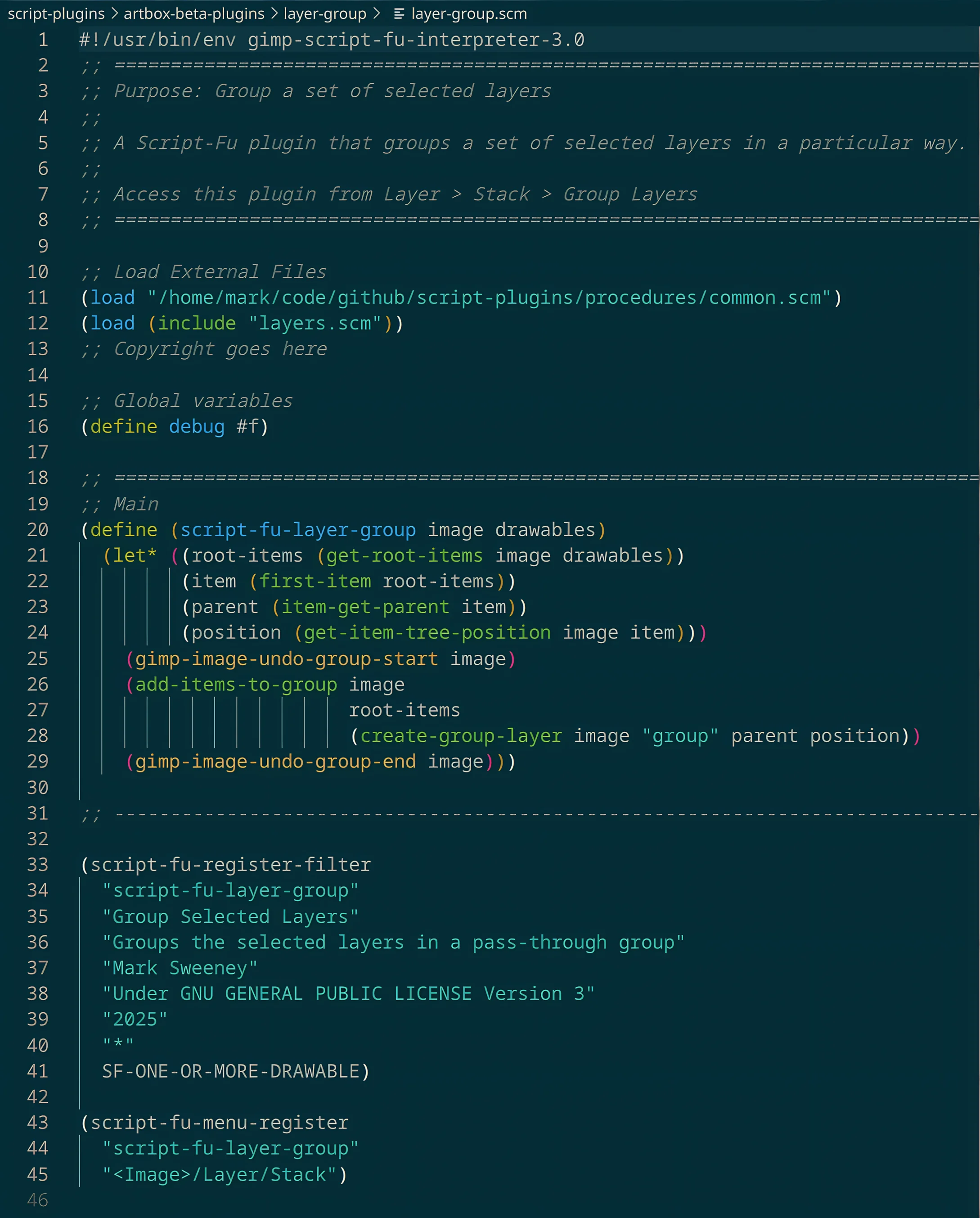
In a way, by structuring our scripts this way, we’re creating our own refined version of Script-Fu, built for our specific needs. Let’s look at some examples.
Random Seed
;; Purpose: Returns a random int for seeding a filter
(define (random-seed)
  (msrg-rand))
While we could use msrg-rand directly in our code, wrapping it inside a function called random-seed improves readability. By giving the function a clear and descriptive name, it becomes easier to understand its purpose at a glance.
Additionally, defining random-seed as a standalone function allows us to use it anywhere in our plug-ins while centralising the implementation in a single location. If we ever need to change how the seed is generated, we only need to update this function, leaving the rest of our code untouched.
For example, if we decide to switch to random instead:
;; Purpose: Returns a random int for seeding a filter
(define (random-seed)
  (random 1000))
The function name remains the same, ensuring that our scripts continue to work without modification. This approach keeps our code flexible, maintainable, and easy to read.
JPEG Exporting
The JPEG exporting function in Script-Fu comes with many parameters, offering fine control over how images are saved. However, in most cases, we only care about a few key settings, such as file name and quality. To simplify the process, we can wrap the function.
;; Purpose: Saves an image as a JPEG with a specified quality
(define (file-jpg-save image file quality)
  (let ((export-file (if (has-substring? file ".jpg")
                         file
                         (string-append file ".jpg")))) ;; Avoid jpg.jpg
    (debug-message "Exporting: " export-file)
    (file-jpeg-export #:run-mode RUN-NONINTERACTIVE
                      #:image image
                      #:file export-file
                      #:options -1
                      #:quality (* 0.01 quality)
                      #:smoothing 0.0
                      #:optimize TRUE
                      #:progressive TRUE
                      #:cmyk FALSE
                      #:sub-sampling "sub-sampling-1x1"
                      #:baseline TRUE
                      #:restart 0
                      #:dct "integer")))
In this wrapper function, most of the export options are hardcoded, exposing only the parameters we are likely to adjust: file name and quality. This approach improves readability and makes saving images simpler.
Additionally, if GIMP’s exporter changes in the future, we only need to update this one function rather than modifying every script that exports a JPEG.
Using the Wrapper
To export a JPEG in our plug-ins, we simply include the library and call our custom function:
(file-jpg-save image "/home/mark/pictures/my-picture" 85)This keeps our code clean, readable, and adaptable while allowing us to export JPEGs efficiently with minimal effort.
Car Replacement
The car function can be cryptic and prone to scripting errors. It’s easy to mistakenly apply car to a vector or a non-list item, leading to unexpected behaviour. To make our code more robust and readable, we can wrap this functionality in a safer function.
;; Purpose: Returns the first item of a list or vector.
;;          Warns if the input is invalid or empty.
(define (first-item collection)
  (cond
    ;; Handle non-empty lists
    ((and (list? collection) (not (null? collection)))
     (list-ref collection 0))
    ;; Handle non-empty vectors
    ((and (vector? collection) (> (vector-length collection) 0))
     (vector-ref collection 0))
    ;; Invalid or empty input
    (else
     (begin
       (warning-message "first-item: Expected a non-empty list or vector, but received: " collection)
       #f))))
This function safely retrieves the first item of a list or vector while providing helpful warnings when invalid or empty inputs are encountered. By using first-item instead of car, we reduce the risk of accidental errors and improve the clarity of our scripts.
Why Use This Wrapper?
- Prevents script crashes – Avoids errors caused by applying car to non-lists.
- Supports both lists and vectors – Expands usability beyond just lists.
- Provides meaningful warnings – Helps debug unexpected input issues.
- Improves readability – The function name clearly conveys its purpose.
By encapsulating this logic in first-item, we make our plug-ins more robust and easier to maintain. Of course, this comes down to personal preference, you may be completely comfortable using car, caar, cadr, and similar Scheme functions directly.
Wrapping a Wrapped Function
Wrapping a function that is already wrapped can further improve readability and maintainability. For example, when working with coordinate pairs like pixel-coords (list 100 200), we could use:
(first-item pixel-coords)to retrieve the x coordinate. However, while functional, this is not very expressive. Instead, we can wrap first-item in a more appropriate definition to make our intent clearer.
;; Purpose: Return the x-coordinate, for readability
(define (x-coord pixel-coords)
  (first-item pixel-coords))

;; Purpose: Return the y-coordinate, for readability
(define (y-coord pixel-coords)
  (second-item pixel-coords))
Why Use This Approach?
- Enhances code clarity – Instead of using generic list access functions, we explicitly define functions that describe their purpose.
- Improves maintainability – If our coordinate representation changes (e.g., using vectors instead of lists), we only need to update these small functions.
- Encourages consistency – Using x-coord and y-coord makes the script easier to read and understand at a glance.
Now, instead of writing in generic Script-Fu:
(car pixel-coords) ;; Gets the x-coordinate
(cadr pixel-coords) ;; Gets the y-coordinate
We can write in our Script-Fu:
(x-coord pixel-coords)
(y-coord pixel-coords)
By wrapping low-level functions in meaningful names, we create a more intuitive way to work with data, reducing confusion and potential errors.
Conclusion
Wrapping functions is a powerful way to simplify Script-Fu development, making scripts more readable, maintainable, and robust. By encapsulating complexity and exposing only the necessary details, we create a more structured approach to writing plug-ins.
Key takeaways from this approach:
- Simplifies repetitive tasks – Instead of manually repeating low-level commands, we create reusable functions.
- Improves code readability – Well-named wrappers make scripts easier to understand.
- Encapsulates complexity – Low-level details are handled inside the wrapper, keeping the main script clean.
- Enhances maintainability – If core functionality changes, we only need to update the wrapper, not every script that relies on it.
- Encourages reuse and consistency – Our personal library of functions grows over time, making development faster and more efficient.
By consistently using function wrapping, we can transform how we write Script-Fu plug-ins, creating a more modular and expressive scripting environment. With these principles in mind, we can continue to refine our approach, developing a more efficient and tailored version of Script-Fu that meets our specific needs.
The next step? Start identifying repetitive or complex sections in your own scripts and refactor them into clean, reusable functions. Your future self will thank you!